Showing posts with label Billion DSL Modem Router WiFi. Show all posts

BiPAC 5200 ADSL2+ Series Web-based Configuration

Configuring with your Web Browser

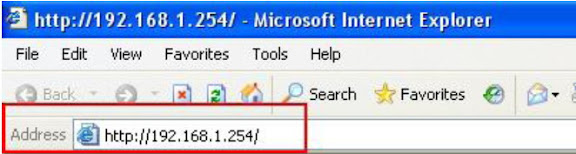
Once your host PC is properly configured, please proceed as follows to use the Graphical User Interface (GUI) Web-based Utility: Start, open any of your web browser and type the private IP address of the BiPAC 5200 Series ADSL2+ Modem/Bridge/Router, which by default is 192.168.1.254 in the URL field and click “Go”, a user name and password window prompt will appear.


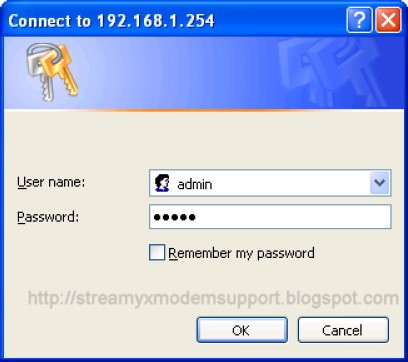
After that, you will be prompted with new window or screen as shown below, enter the default User Name admin and the default Password admin, and then click OK to access to the Quick Start screen. You can follow the steps below to complete the Quick Start.

Note:

If you can not Log In the BiPAC 5200 Series ADSL2+ Router learned how-to do-it-yourself troubleshooting this device, click here.


Congratulation! You are now successfully logon to the BiPAC 5200 Series ADSL2+ Router!

Step 1: Select the Quick Start tab, then click RUN WIZARD, and you will see the next screen.
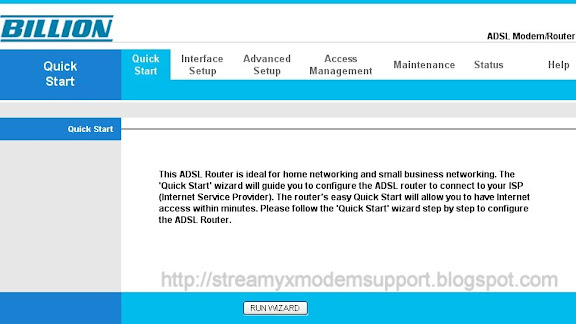

Click the NEXT button.
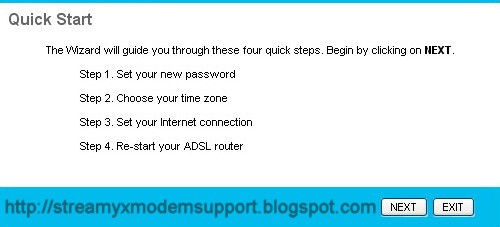
Click NEXT to continue.
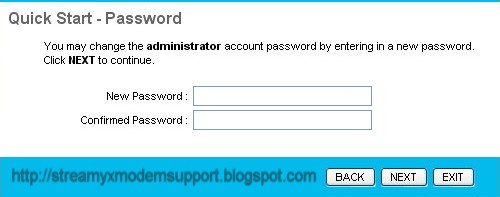

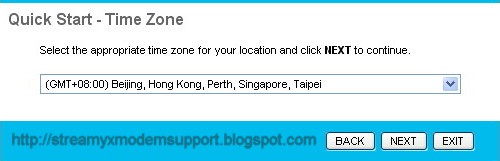
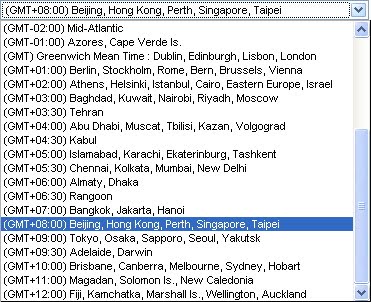
Step 2: Configure the time for the Router, and then click the NEXT button.


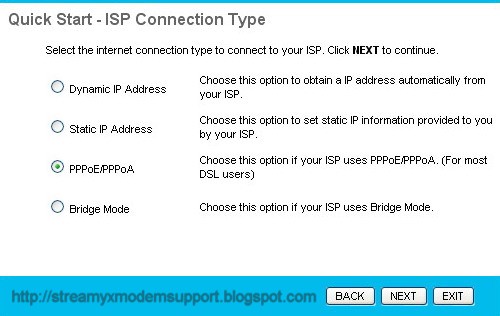
Step 3: Select the connection type to connect to the ISP (We select PPPoE/PPPoA mode for example here), and then click the NEXT button.

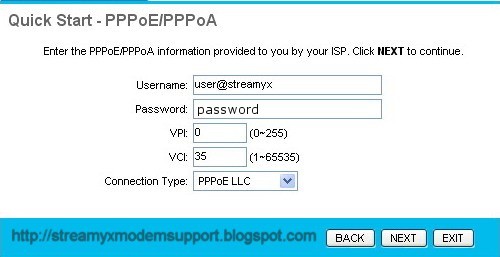
Step 4: Configure the following options provided by your ISP: Username, Password, VPI, VCI and Connection Type. Then click Next.

Step 5: Click NEXT to finish the Quick Start.
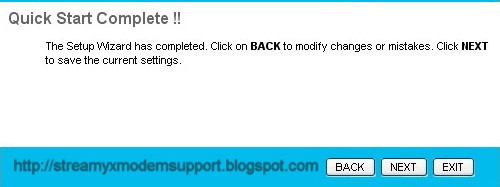

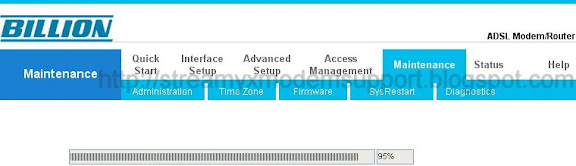
Step 6. Quick Start Completed and Saved Changes, Click Close and Restart the Router



For any question about Streamyx DSL Broadband Internet Connection you can call TM (Telekom Malaysia) just dial 100 by using your landline phone and speak to their Customer/Technical Support Representative they are very helpful regarding any issue.
For other network telco's (mobile phone) dial 1300-888-123 or email at help@tm.com.my

Feel FREE to post your comments, suggestions or any questions regarding any issues about Streamyx DSL Broadband Internet Connection, Modem and Router and also wireless networking I can assure you to reply your post.
BiPAC 5200 ADSL2+ Series CD-based Installation

Step-by-Step Installation

1. Insert the CD-ROM into CD-ROM drive
2. Execute Windows Utility
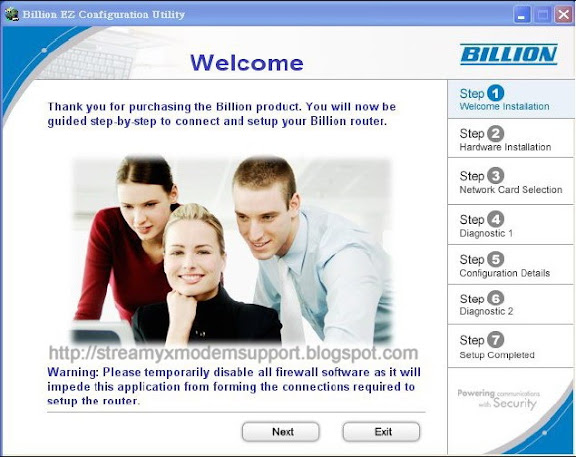
3. The Welcome screen will appear, click Next.
4. To Configure the BiPAC 5200 Series with out using the Windows CD Utility, Click here.


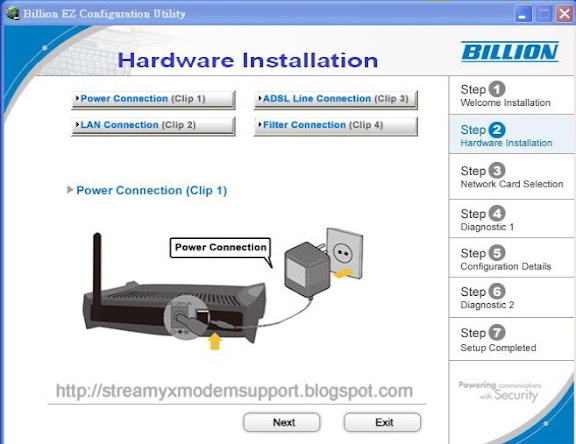
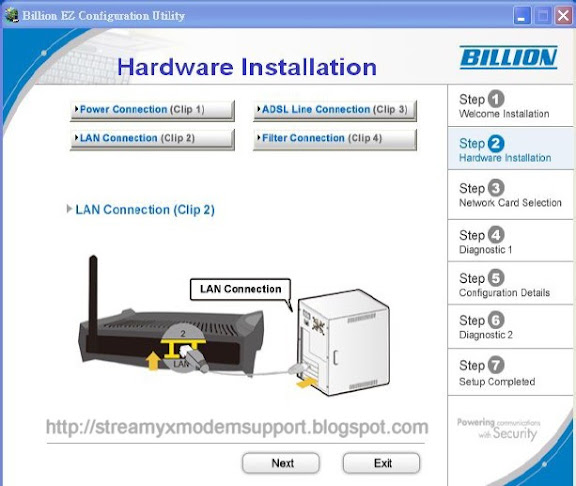
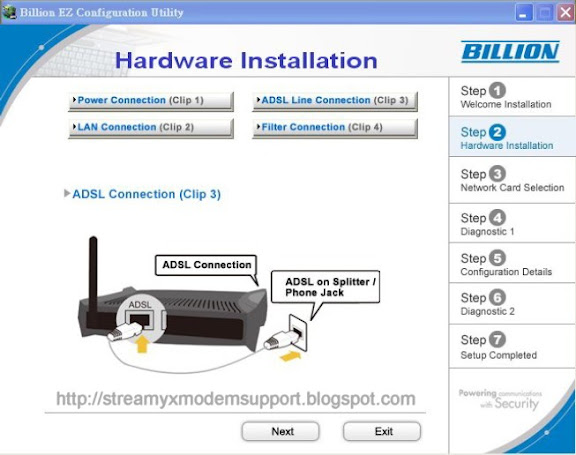
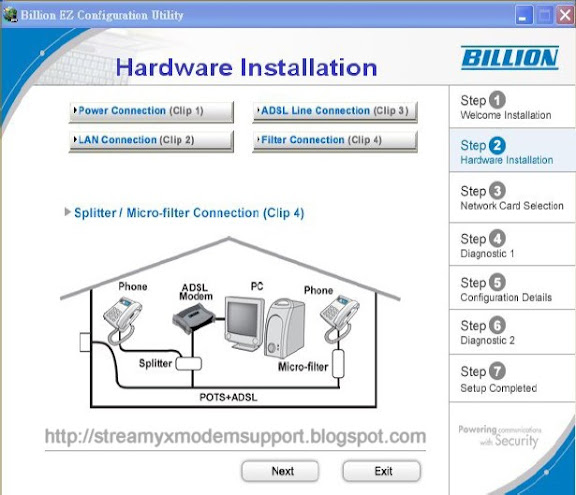
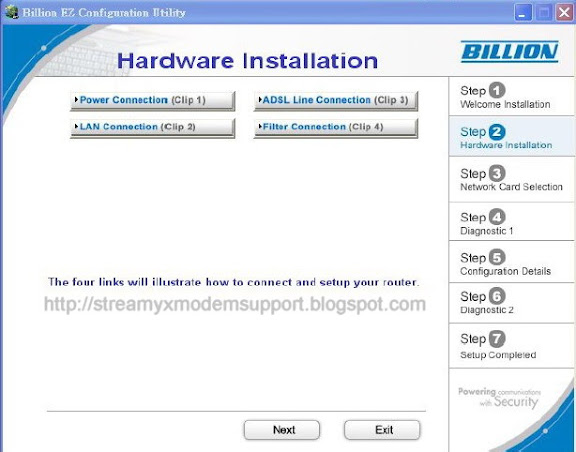
4. The Hardware Installation screen will appear. Four links are shown on the screen.
Click them one by one and follow the guidelines to complete hardware installation.


4.1 Power connection


4.2 LAN connection


4.3 ADSL Line connection


4.4 Filter connection


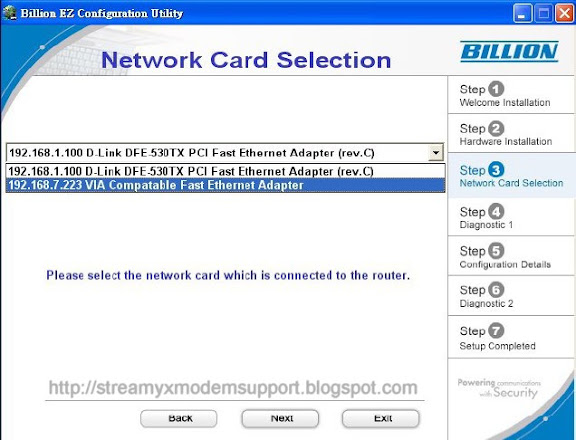
5. When finished Hardware Installation, click “Next” to proceed to next step, Network Interface Controller (NIC) Card Selection.


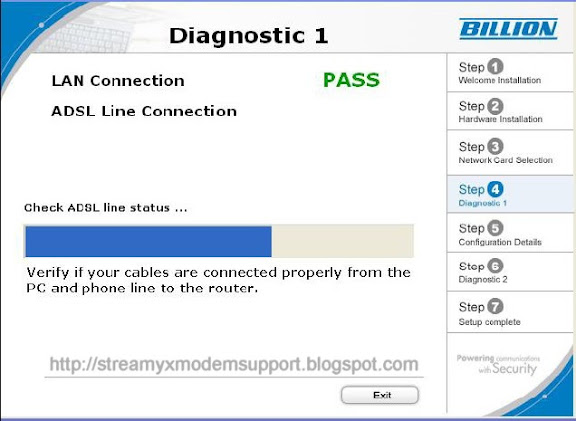
6. Diagnostic screen. (If connection fails, the screen will show “FAIL” , please check your router is connected correctly.)

7. Click Next to enter Configuration Details


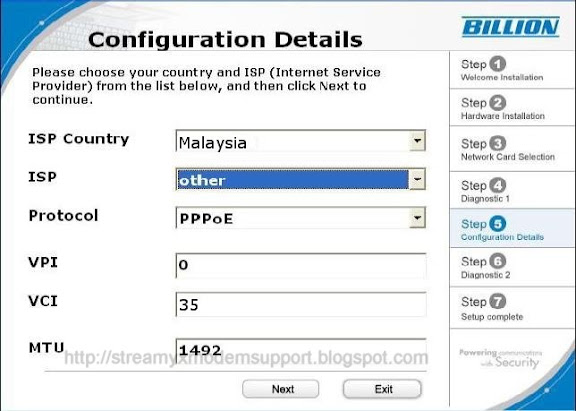
8. Set up more detailed settings such as Country, ISP, Protocol, VPI, VCI and MTU.


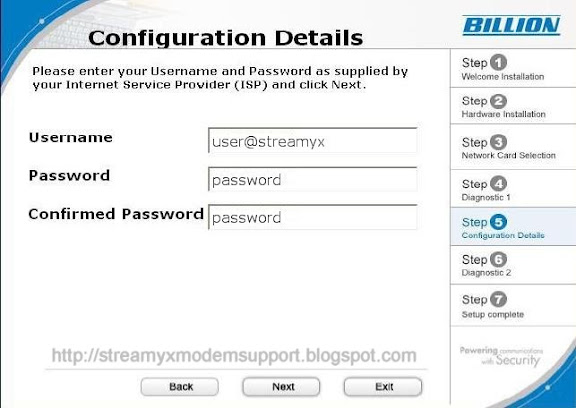
9. Please enter “Username” and “Password” as supplied by your ISP (Internet Service Provider) and click next.


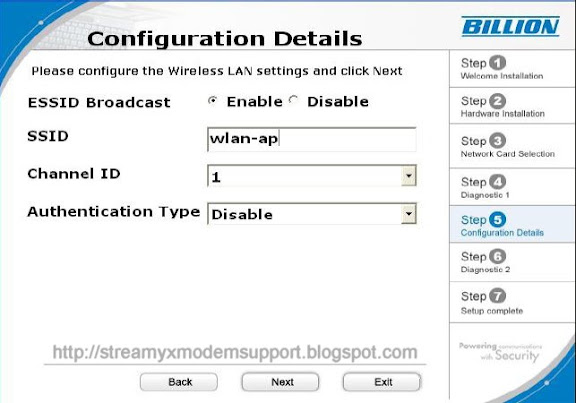
10. For BiPAC 5200G/ 5200GR2/ 5200GR3/ 5200GR4/ 5200GR5 only. Please configure the Wireless LAN setting and click next. (If your router does not support wireless, please ignore this screen and it will not appear.)


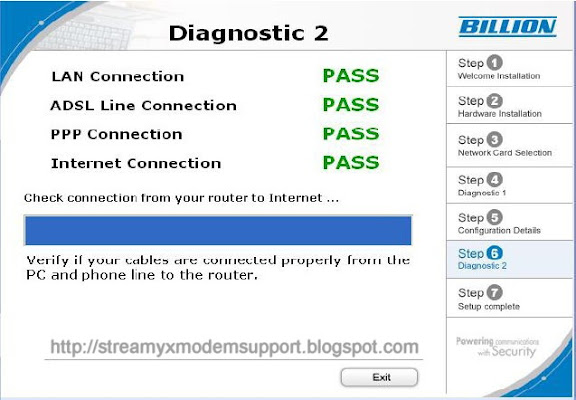
11. Click Next to proceed to Diagnostic screen


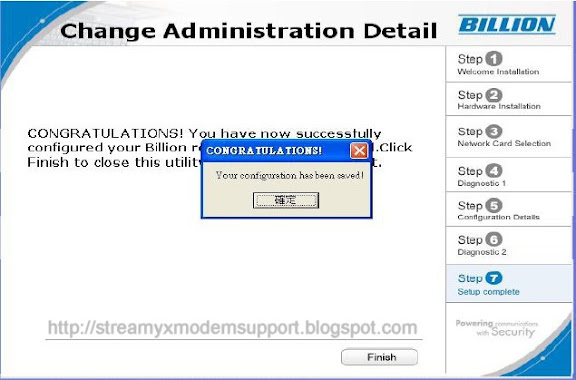
12. Congratulations!! You’ve completed the setup procedure and are ready for surfing the Internet. Enjoy using the Streamyx DSL Broadband Internet Connection.


13. The IE browser will be opened automatically when you finish installing.

Quick Installation Guide

PC Configuration

Directly connect your PC (personal computer) Network Interface Controller (NIC) card or adapter to the Billion BiPAC 5200 Series (modem/router ) to the LAN/Hub/Switch port using any Cat5 cross or straight patch cable. Then, you need to configure your PC IP address.

Follow the steps below to configure it.

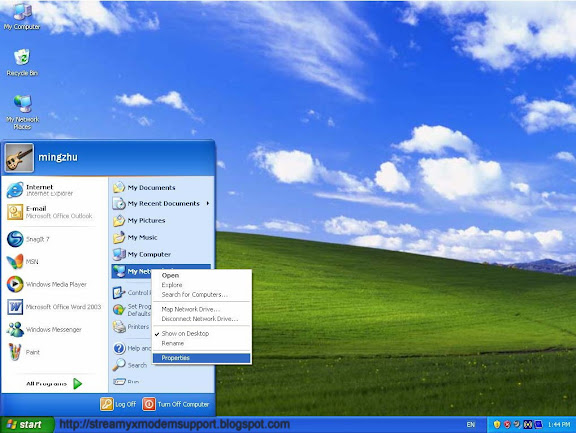
Step 1: Click the Start menu on your desktop, right click My Network Places, and then select Properties as shown below in Figure 1.


Figure 1

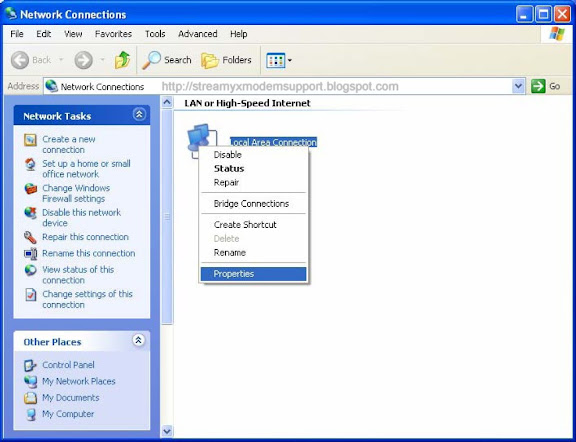
Step 2: Right click Local Area Connection (LAN), and then select Properties.


Figure 2

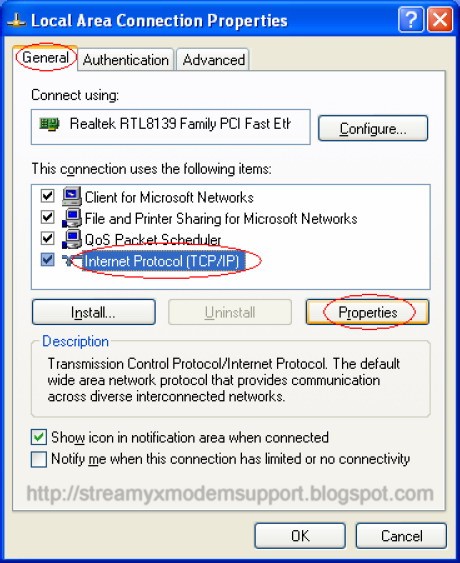
Step 3: Select General tab, highlight Internet Protocol (TCP/IP), and then click the Properties button.


Figure 3

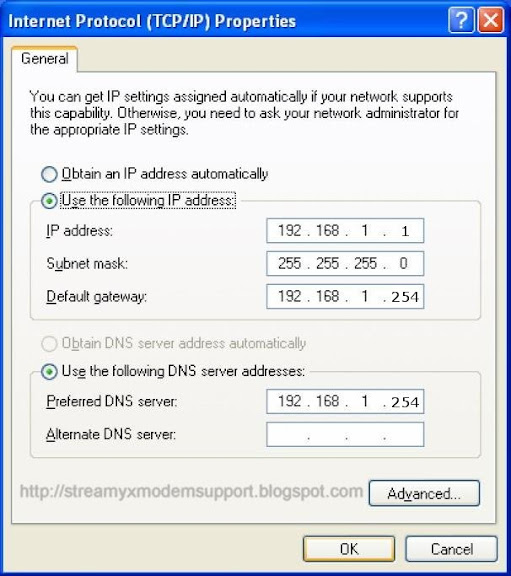
Step 4: Configure the IP address as Figure 4 showns. After that, click OK.


Figure 4

Note: You can configure the PC to get an IP address automatically, select “Obtain an IP address automatically” and “Obtain DNS server address automatically” in the screen above.

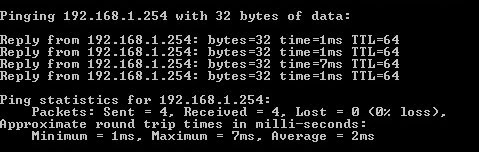
Now, you can run the Ping command in the command prompt to verify the network connection. Please click the Start menu on your desktop, select run tab, type cmd in the field, and then type ping 192.168.1.254 on the next screen, and then press Enter. If the result displayed is similar to the screen below, the connection between your PC and the Modem/Router has been established.


Figure 5

Click here to continue configure Streamyx DSL Broadband Internet Connection.

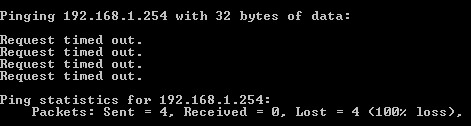
If the result displayed is similar to the screen shown below, it means that your PC has not connected to the Billion BiPAC 5200 Series.


Figure 6

You can check it follow the steps below:

1) Is the connection between your PC and the Billion BiPAC 5200 Series correct? The LEDs of LAN port which you connected/link to the device and the LEDs on your PC network interface controller (NIC) card or adapter should both lit.

2) Is the TCP/IP configuration for your PC correct? If the Billion BiPAC 5200 Series IP address is 192.168.1.254, your PC IP address must be within the range of 192.168.1.1 ~ 192.168.1.253 only.

3) Check if the physical wiring connection between your PC and your device, the Billion BiPAC 5200 Series is properly plug to the port both end,. Make sure also the Modem/Router is power ON.

Click here To learned on how-to do-it-yourself troubleshooting Modem/Router.
Click here To configure Streamyx DSL Broadband Internet connection.

Pocket-size ADSL2+ Modem/Router

Billion's BiPAC 5200(S) is an easy-to-use yet economical pack of ADSL2+ Modem/Router perfectly designed for home and SOHO users to enjoy rich firewall security, user-friendly Web interface, and faster speed when using ADSL Internet connection. The router lets you share high-speed ADSL Internet connection, even faster with advanced ADSL2+ capability of downstream rate up to 24Mbps. The powerful SOHO Firewall feature protects against hackers' attacks when you surf the Internet. VPN pass-through is also built-in for secure access. In addition, the web-based Graphic User Interface allows you to install and manage your network easily. The BiPAC 5200(S) makes fast net surfing affordable and easy - Going online is just 'plug & play'.

Streamyx Step-by-Step Installation Guide
Streamyx Quick Installation Guide Step 1
Streamyx Quick Installation Guide Step 2
Application Diagram
ADSL Application Diagram (BiPAC 5200 - Pocket-size ADSL2+ Modem/Router)
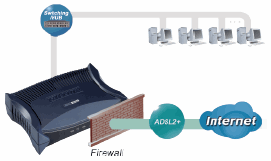
ADSL Application Diagram (BiPAC 5200S - Pocket-size ADSL2+ Modem/Router)


Key Features
  • High speed Internet access with ADSL2/2+; backward compatible to ADSL
  • Easy Network Management Integrated with 4-port Ethernet Switch (BiPAC 5200), Single Ethernet Port (BiPAC 5200S)
  • SOHO Firewall Security with DoS Prevention and Packet Filtering
  • Universal Plug and Play (UPnP) Compliant
  • Dynamic Domain Name System (DDNS)
  • Supports Virtual Private Network (VPN) pass-through
  • Ideal for Home and SOHO Users
Benefits

Express Internet Access
The router complies with ADSL worldwide standards. It supports downstream rate up to 12/24 Mbps with ADSL2/2+, 8Mbps with ADSL and upstream rate up to 1 Mbps. With this technology, users enjoy not only highspeed ADSL services but also broadband multimedia applications such as interactive gaming, video streaming and real-time audio much easier and faster than ever. Particularly, Annex M standard combined in the model of BiPAC 5200(S)A supports the latest ADSL2/2+ for higher upload speeds by doubling the upstream data rate.

SOHO Firewall Security
Along with the built-in NAT firewall feature, the router also provides advanced hacker pattern-filtering protection. It can automatically detect and block Denial of Service (DoS) attacks. In addition to the NAT technology, the BiPAC 5200/5200S supports Packet Filtering for high-level security control.

Easy Network Management
The Web-based User Interface makes the BiPAC 5200(S) extremely easy for users to install and manage the network. With DHCP client and server built-in, system administrators can easily attach this security router into existing network and manage the IP assignment without re-configuring other stations. Furthermore, future firmware upgrade can be done via the friendly Web-based User Interface.


Features & Specifications

ADSL Compliance
• Compliant with ADSL Standard
- Full-rate ANSI T1.413 Issue 2
- G.dmt (ITU G.992.1)
- G.lite (ITU G.992.2)
- G.hs (ITU G.994.1)
- ADSL over ISDN/U-R2
• Compliant with ADSL2 Standard
- G.dmt.bis (ITU G.992.3)
- ADSL2 Annex M (ITU G.992.3 Annex M)
(Available for BiPAC 5200(S)A model only)
• Compliant with ADSL2+ Standard
- G.dmt.bisplus (ITU G.992.5)
- ADSL2+ Annex M (ITU G.992.5 Annex M)
(Available for BiPAC 5200(S)A model only)

Network Protocols and Features
• NAT, static routing and RIP-1/2
• NAT supports PAT and multimedia applications
• Multi-to-multi NAT
• Transparent Bridging
• Dynamic Domain Name System (DDNS)
• SNTP
• DNS relay

Firewall & Virtual Private Network (VPN)
• Built-in NAT Firewall
• Prevent DoS attacks including Land Attack, Ping of Death, etc.
• Anti probe function
• Packet filtering
• Password protection for system management
• VPN pass-through

Operating Environment
• Operating temperature: 0 ~ 40ºC
• Storage temperature: -20 ~ 70ºC
• Humidity: 20 ~ 95% non-condensing

ATM and PPP Protocols
• ATM Adaptation Layer Type 5 (AAL5)
• Multiple Protocol over AAL5 (RFC 2684, formerly RFC 1483)
• Bridged or routed Ethernet encapsulation
• VC and LLC based multiplexing
• PPP over Ethernet (PPPoE)
• PPP over ATM (RFC 2364)
• OAM F4/F5
• ATM QoS: UBR, CBR, VBR-rt, VBR-nrt

Management
• Web-based configuration
• Firmware upgrade and configuration data upload and download via HTTP/FTP
• SNMP v2 MIB supported
• Supports DHCP server/client/relay

Models & Standards Support
• BiPAC 5200(S)A: Annex A & Annex M
• BiPAC 5200(S)B: Annex B
• BiPAC 5200(S)U: U-R2
• Annex A and Annex M: ADSL over POTS
• Annex B and Annex U-R2: ADSL over ISDN

Hardware Specification
Physical Interface
• LINE: ADSL port
• LAN: 4-port 10/100M auto-crossover (MDI/MDI-X)
switch (Single port for BiPAC 5200S)
• Factory default reset button
• Power jack
Physical Specification
• Dimensions: 5.20" x 3.70" x 1.38”
(132mm x 94mm x 35mm)
Power Requirement
• (BiPAC 5200) Input: 12V DC, 1A
• (BiPAC 5200S) Input: 12V AC, 1A

Source: Billion.com

Pocket-size ADSL2+ Modem/Router

Billion’s BiPAC 5200S RC/RD is an easy-to-use yet economical pack of ADSL2+ Modem/Router perfectly designed for home and SOHO users to enjoy rich firewall security, user-friendly Web interface, and faster speed when using ADSL Internet connection. The router lets you share high-speed ADSL Internet connection, even faster with advanced ADSL2+ capability of downstream rates of up to 24 Mbps. The powerful SOHO Firewall feature protects against hackers’ attacks when you surf the Internet. VPN pass-through is also built-in for secure access. In addition, the web-based Graphic User Interface allows you to install and manage your network easily. The BiPAC 5200S RC/RD makes fast net surfing affordable and easy - Going online is just ‘plug & play’.

Streamyx Manual Configuration Step1
Streamyx Step-by-Step Installation
Application Diagram


Key Features
  • High speed Internet access with ADSL2/2+; backward compatible with ADSL
  • Easy Network Management
  • Single Ethernet Port
  • SOHO Firewall Security with DoS Prevention and Packet Filtering
  • Universal Plug and Play (UPnP) Compliant
  • Dynamic Domain Name System (DDNS)
  • Supports Virtual Private Network (VPN) pass-through
  • Ideal for Home and SOHO Users
Benefits

Express Internet Access
The router complies with worldwide ADSL standards. It supports downstream rates of up to 12/24 Mbps with ADSL2/2+, 8 Mbps with ADSL, and upstream rates of up to 1 Mbps. With this technology, users enjoy not only high-speed ADSL service but also broadband multimedia applications such as interactive gaming, video streaming and real-time audio much more quickly and easily than ever. Particularly, the Annex A+M model also supports the latest ADSL2/2+ for higher upload speeds by doubling the upstream data rate.

SOHO Firewall Security
Along with the built-in NAT firewall feature, the router’s advanced anti-hacker pattern-filtering protection feature automatically detects and blocks Denial of Service (DoS) attacks. In addition to the NAT technology, the BiPAC 5200S RC/RD supports Packet Filtering for high-level security control.

Easy Network Management
The Web-based User Interface makes the BiPAC 5200S RC/RD extremely easy for users to install and manage the network. The router supports DHCP client and server, enabling system administrators to easily fit this router into existing network environment and manage the IP assignment without re-configuring other stations. Furthermore, future firmware upgrades can be downloaded via the user-friendly Web-based Interface.


Features & Specifications

ADSL Compliance
• Compliant with ADSL Standard
- Full-rate ANSI T1.413 Issue 2
- G.dmt (ITU G.992.1)
- G.lite (ITU G.992.2)
- G.hs (ITU G.994.1)
- ADSL over ISDN/U-R2
• Compliant with ADSL2 Standard
- G.dmt.bis (ITU G.992.3)
- ADSL2 Annex M (ITU G.992.3 Annex M)
(Available for BiPAC 5200S RCA/5200S RDA model only)
• Compliant with ADSL2+ Standard
- G.dmt.bis plus (ITU G.992.5)
- ADSL2+ Annex M (ITU G.992.5 Annex M)
(Available for BiPAC 5200S RCA/5200S RDA model only)

Network Protocols and Features
• NAT, static routing and RIP-1/2
• Multi-to-multi NAT
• Transparent Bridging
• Dynamic Domain Name System (DDNS)
• SNTP
• DNS client/relay

Firewall & Virtual Private Network (VPN)
• Built-in NAT Firewall
• Prevents DoS attacks including Land Attack, Ping of Death, etc.
• Anti probe function
• Packet filtering
• Password protection for system management
• VPN pass-through

Operating Environment
• Operating temperature: 0 - 40oC
• Storage temperature: -20 - 70oC
• Humidity: 20 - 95% non-condensing

ATM and PPP Protocols
• ATM Adaptation Layer Type 5 (AAL5)
• Multiple Protocol over AAL5 (RFC 2684, formerly RFC 1483)
• Bridged or routed Ethernet encapsulation
• VC and LLC based multiplexing
• PPP over Ethernet (PPPoE)
• PPP over ATM (RFC 2364)
• OAM F4/F5
• ATM QoS: UBR, CBR, VBR-rt, VBR-nrt

Management
• Web-based configuration
• Firmware upgrades and configuration data upload and download via HTTP/FTP
• SNMP v2 MIB supported
• Supports DHCP server/client/relay
• TR-069 supports remote management (BiPAC 5200S RD only)

Hardware Specifications
Physical Interface
• DSL: ADSL port
• Ethernet: single port 10/100M auto-crossover (MDI/MDI-X) switch
• Factory default reset button
• Power jack
• Power switch (BiPAC 5200S RD only)
Physical Specifications
• Dimensions: 5.53" x 3.56" x 1.38” (140.5mm x 90.5mm x 35mm)
Power Requirements
• Input: 12V AC, 1A

Models & Standards Supported
Product Models
• BiPAC 5200S RC/RD: Pocket-size ADSL2+ Modem/Router
Standards
• BiPAC 5200S RCA/5200S RDA:
Supports Annex A and Annex M (Annex A and Annex M: ADSL over POTS)
• BiPAC 5200S RCU/5200S RDU:
Supports Annex B and U-R2 (Annex B and U-R2: ADSL over ISDN)

Source: Billion.com
Related Posts Plugin for WordPress, Blogger...